One line installs the openovai command. One more creates an instance: a
directory of its own, signed in to its own account, served on one port. Node.js and Claude
Code are fetched for you, pinned per release. Nothing global, no sudo.
From nothing to a Leader answering
Get the openovai command
curl -fsSL https://raw.githubusercontent.com/nilcaream/openovai/main/openovai | sh
It is one shell script. Read from a pipe, it installs itself: a copy under
~/.local/share/openovai/ and a link at ~/.local/bin/openovai,
and it says so. If ~/.local/bin is not on your PATH it prints
the one line to add to your shell profile and asks you to open a new terminal — it
never edits a profile itself. Once per user; every instance after that starts from it.
With Node.js 24 or newer there is another way in, and it does this step and the next at
once:
npx @openovai/ovai@latest
The package is the release. It asks the same questions as the next step and takes the
same options, needs no download for the release itself, and leaves no
openovai command behind. Node.js and Claude Code are fetched at the first
ovai start, which needs sh, curl or
wget, tar, sha256sum or shasum and
uname, as the other way does.
@latest is written out because npx reuses a copy it has cached for a name
given with no version; @openovai/ovai@<version> names a release.
ovai update takes later releases from GitHub, signed, whichever way the
instance was made.
Create the first instance
~/.local/bin/openovai
With no arguments the release's installer asks its questions: where the instance lives,
who it works for, the Leader's name, the models, the port, how it signs in. Before
anything else openovai says which version it resolved — openovai
<version> (latest) — downloads that release once, fetches the Node.js and Claude
Code it pins, and hands over to its installer. The directory has to be empty or new.
[media 5]recording, 20–30 s: from the one-liner to the page opening —
the version resolved, the runtimes fetched, ovai start printing the one-time link
Sign in, and start
# if the instance signs itself in (--auth login): opens a browser once,
# and the credential stays inside the instance
~/workspace/bin/ovai login
# start the server in the background: it prints a one-time link to the page and returns
~/workspace/bin/ovai start
# a new link, for another browser or once the first has run out
~/workspace/bin/ovai url
Open the link it prints. It works once, for ten minutes, and signs that browser in: it
stays signed in across restarts and updates, and nothing else on the machine that reaches
the port gets the page. ovai url prints a new link, for each further browser.
The Leader's panel is in the middle; type what you want and the Leader starts.
ovai status says whether the server is running and where,
ovai stop stops it.
A second instance, on one line
~/.local/bin/openovai --root ~/second --user Ana --leader Max \
                      --leader-model opus --worker-model sonnet --port 7800 --auth login
~/second/bin/ovai login
~/second/bin/ovai start
Every argument after the version is the release installer's own, passed through as it is:
give them all and nothing is asked, so one command line describes a whole instance and
can be read back, repeated and tested. Two instances on one machine share the runtimes
and nothing else — not the account, not the transcripts, not the port. A later
instance simply gets the newest release, said out loud; the older one catches up with
ovai update.
The options
Each one is the installer's; openovai passes them through and knows only one
of its own, the version.
openovai [version]
openovai <version> … or openovai --version <version> …
takes that release; absent, the newest release on GitHub at that moment, printed before
anything is done. Asked interactively, the choice offers latest and the
versions already downloaded.
--root
Where the instance lives. It has to be empty or new. With --force an install
over an instance already in place is an update of it: the payload is replaced whole and
every file of yours is kept.
--user
The person the team works for.
--leader
The name of the session that leads the team.
--leader-model, --worker-model
The models those sessions run on, offered as opus for the Leader and
sonnet for the Workers; opus/high names an effort too. A Worker can
be hired onto another one later, and its desk keeps that one from then on.
--port
The port the page listens on, on 127.0.0.1 only. 0 means
whatever is free, and ovai start prints the address it actually got; pick a
number when you want the same one every time — a bookmark, or the page installed as a
web app.
--auth
How the instance gets an account: login or inherit. Below.
What it needs
Linux or macOS, x86_64 or arm64, with sh, curl or wget,
tar, sha256sum (or shasum, as a Mac has it),
ssh-keygen from OpenSSH 8.1 or later, and uname. macOS is built for
and checked with stand-ins on Linux, but ovai has not yet been run on a Mac. WSL 2 has not
been tried, and native Windows is not supported. To try WSL 2, keep the instance in the Linux
file system and off /mnt/c. Nothing else: no Node.js, no npm, no Claude Code on the machine —
but for the npx way in, which runs its installer on a Node.js 24 or newer you
already have, is refused by npm on Windows, and still needs sh,
curl or wget, tar, sha256sum or
shasum and uname at the first ovai start, where the
instance fetches what it runs on. The rest the installer brings: the Node.js and Claude Code
an instance runs on are pinned, exactly, per release — chosen and tested when the release is cut
— fetched from a fixed address and checked against a checksum, and kept under
~/.local/share/openovai/, per user, outside every instance. Instances on one
machine share those runtimes and reuse what is already there; an instance runs them by
absolute path and never touches, nor uses, a Node.js or Claude Code the system already has.
Nothing lands on your PATH but the openovai command.
Signing in
An instance needs an Anthropic account before it can answer anything. --auth
picks how it gets one.
--auth login
The instance signs itself in. A freshly installed one has an empty Claude Code home, so
ovai login opens a browser once and the credential is kept inside that
instance. Use this when two instances on one machine should be two different accounts.
The server looks once a day at when that sign-in runs out, and five days before it the
Leader's panel gets one row with the date and the hour: run ovai login before
then. Once it has run out and cannot be renewed, a panel whose turn failed on it, a turn
started by an event of the server's or by a restart included, says, once,
to run ovai login in a terminal and type again.
--auth inherit
The instance takes CLAUDE_CODE_OAUTH_TOKEN from the environment it is started
in. Mint that token once on the machine with claude setup-token, export it
wherever instances are started from, and every one of them is signed in from its first
message, with no browser in the way. The token is long-lived but not forever and cannot
refresh itself: when it expires every instance stops at once with the same message, and a
new token fixes them all. ovai login refuses under this option and says so.
Either way the instance's Claude Code home is its own, so transcripts and settings stay
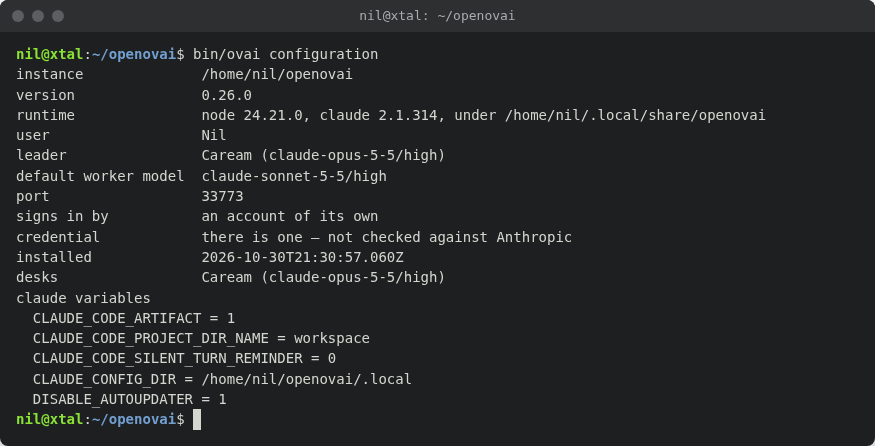
separate. ovai configuration reports whether the instance has a credential and
says plainly that it has not checked it against Anthropic: finding out costs a request, so
the first message is where a dead credential shows up. ANTHROPIC_API_KEY and
ANTHROPIC_AUTH_TOKEN are removed from what an instance runs with, under both
options.
ovai configuration: the version, the seats and their models, the port, how it signs in
From a clone
The same installer, run from the repository instead of a downloaded release:
git clone https://github.com/nilcaream/openovai.git
cd openovai
./install.sh --root ~/workspace --source . --user Ana --leader Max \
             --leader-model opus --worker-model sonnet --port 7799 --auth login
--source is where to install from: a clone, or an unpacked release. The instance
copies bin/ and lib/ in, so it never reaches back to where it was
installed from. A clone with nothing git status --porcelain lists, on any branch,
puts the instance on the commit it was installed from: its version is the first 8 characters
of that commit's hash. A clone with changes, or a directory that is not a clone, is installed
on the lib/VERSION it carries.
Taking a newer version
An instance carries its own copy of the toolkit and does not follow it along on its own. ovai update is how it catches up:
~/workspace/bin/ovai update
It asks GitHub for the latest release, and if that is newer than the version this instance is
on it takes it, once it has checked it: the release's signature against the keys in the
instance's own lib/RELEASE_KEYS, the package against the SHA256SUMS
that signature covers, and the lib/VERSION inside against the tag, all before
anything is replaced. A release without them is not taken, and GitHub's own archive of a tag
never is. The openovai command checks the same before it unpacks anything. Then
the payload — bin/ and lib/ — is
replaced whole, and the rest is done by the version it brought in: it runs bin/ovai
update --finish from the payload it just put in place, which fetches the new runtime,
takes away what the new version retires, seeds once a file of yours that a fresh install of
this version would have seeded and this instance has not got, and wires the hook it runs. On the
version the instance is already on, ovai update runs that same finish. Taking
0.21.0 is itself done the old way, by the version before it and unchecked; from there on every
release is checked. Get the openovai command again with the curl … |
sh line above so it pins the key too, since a copy installed earlier never checks. The
signature proves a release was made by the repository's release workflow, not that anybody
reviewed it. When the new release pins a newer Node.js or Claude Code, those are
fetched beside the ones already there, and an instance still on the older release keeps using
the older ones. Desks, conversations, knowledge/, customization/,
plugins/, openovai.json and the Claude Code home are left alone. The
settings are left alone but for two things: the subagent hook is wired into a settings file
that lacks it, an older command for it replaced, the shell hook versions before 0.26.0 ran
taken out and any hook of your own kept, and commit
attribution is turned off in one that says nothing about it; no rule is added. A rule a fresh
instance of the new version starts with and yours lacks is instead asked for on the Leader's
panel, one permission popup per rule at every start of the server, with what ovai recommends
and Ignore; nothing is added without a press, and Ignore is remembered in
.claude/ignored-defaults.json. There is no rollback: taking the release again is
the fix.
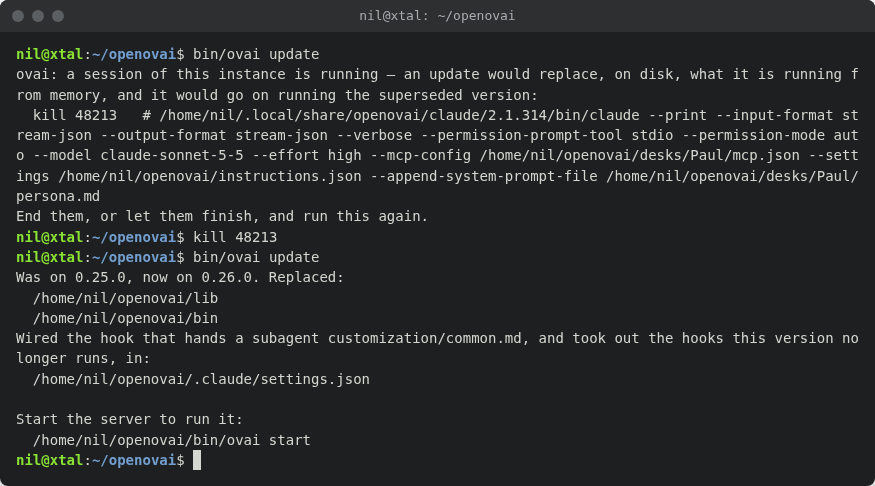
It refuses while the server is running, and while any session of this instance is running
— found on the machine and named with the kill that ends it. It refuses to
go backwards by name; --downgrade takes an older release anyway, and
--from <url or directory> takes one from somewhere other than GitHub:
only an http or https address is fetched, and anything else is a directory, named when it does
not exist, cannot be read or is not a directory. A directory is not checked for a signature.
--from a clone takes a build of main, named by its commit. The clone
must be on main with nothing git status --porcelain lists, or the
update refuses in one line that says which. The instance is then on the first 8 characters of
that commit's hash, and that is its version wherever ovai shows one: ovai
configuration, the page, the server's health. A hash has no order, so a release is
always taken onto a build, with no --downgrade; another commit is always taken;
the same commit replaces nothing and runs the finish. Going back with --downgrade
to a version before 0.20.0 leaves the hook in .claude/settings.json naming
lib/hooks/run.sh, which the older version does not have: the downgrade says so,
and it is rewired by hand. An instance on 0.19.0 reads a clone as the release its
lib/VERSION names, so its first build is taken with the clone's own updater:
node <clone>/lib/ovai.mjs --root <instance> update --from
<clone>.
ovai update refusing while a session runs, then taking the release
A persona is rendered once, when a seat's process starts, from the templates the instance
has at that moment. So an update changes nothing for a process already running; every
process started after it is rendered from the new templates. What each release changed is in
the release notes,
written for whoever runs the workspace that takes it.
The ovai command
Each instance has one, at <instance>/bin/ovai. With no command it prints the
help.
command
what
ovai start
starts the server in the background and prints a one-time link to the page, good for ten minutes, and one line per Claude Code variable saying what the sessions get of it (values masked); a port already taken names the process that holds it. Typed in a session's own shell, it hands that session on to nothing: the server and its seats start without the session's own variables
ovai url
a new one-time link to the running page, for another browser; the link before it no longer opens anything. not running (exit 3) when there is no server
ovai status
not running (exit 3), or running at <url> (pid, since) — found out by asking the address, not by trusting a file
ovai stop
parks the room — every Worker is closed and the Leader writes its desk and stops, by a deadline — then closes the server; not running is not a failure
ovai restart
the two in a row, and prints the new address
ovai
      configuration
what this instance is: version, who works here, on which models, the port, how it signs in, whether it has a credential, every desk with what it runs on, and last what the sessions get of the shell's Claude Code variables, as the server last started with them
ovai login
signs the instance in, once, under --auth login
ovai claude
opens Claude Code on this instance, to reach its own commands — its configuration is the instance's rather than yours. A permission rule changed there applies at each seat's next call; the rest is not live when it quits: a seat reads its configuration when it starts, so ovai restart is what picks it up, and that interrupts whatever the seats are doing. The Leader is told that admin mode ran — within seconds when the server is running, else at its next start — and which of the instance's configuration files changed, by name
ovai plugin <name>
writes plugins/<name>.mjs from a scaffold — see plugins
ovai update
takes the latest release, as above
Next
The page is open and the Leader is in the middle. The Leader and the
Workers says what to type and what happens then.
 OpenOv AI